Most searches for typeform alternatives start with a simple frustration: response limits, pricing, branding, or the one-question-at-a-time format.
Those are real reasons to compare tools. But they are not the whole decision.
If your forms collect regulated data, live inside a customer portal, support tenant-specific workflows, or need to connect directly to your application APIs, the better question is not “Which tool costs less than Typeform?” It is “Which layer of the system should own this form?”
Quick Comparison: Which Typeform Alternative Fits The Job?
| Scenario | Better-fit category | Examples to evaluate |
|---|---|---|
| Marketing forms, lead capture, quizzes, landing pages | Presentation-first form builders | Typeform, Tally, Fillout, Jotform |
| Product feedback, NPS, CSAT, in-app surveys | Survey and feedback platforms | Formbricks, SurveyMonkey, Qualtrics, SurveySparrow |
| Open-source or privacy-first survey collection | Self-hosted survey tools | Formbricks, LimeSurvey, HeyForm, OpnForm |
| Regulated intake, portals, claims, onboarding, internal workflows | Form infrastructure | Form.io |
| Customer-facing SaaS form building | Embedded and white-labeled form infrastructure | Form.io |
| Forms that need generated APIs and submission permissions | Schema-driven form/API platforms | Form.io |
Why Teams Look For Typeform Alternatives
Typeform has a clear job. It helps teams create polished, conversational forms without building a custom form experience from scratch. For many marketing, survey, quiz, and customer-feedback workflows, that is enough.
But the market around Typeform alternatives has grown because buyers often hit one of five limits.
First, pricing and response limits can become frustrating. Tally positions itself directly against Typeform by emphasizing unlimited forms and responses on its free plan, while Typeform’s free plan is limited to 10 monthly responses in Tally’s comparison (Tally Typeform alternative).
Second, some teams want more layout flexibility. Fillout argues that Typeform is recognizable and polished, but more opinionated, while Fillout gives teams multi-page forms with more control over page structure and integrations (Fillout vs Typeform).
Third, privacy and self-hosting are becoming a separate buying category. Formbricks frames itself as an open-source Typeform alternative with a self-hosted Community Edition for teams that want more control over data ownership (Formbricks Typeform alternative).
Fourth, regulated teams need clearer data boundaries. Typeform publishes security, data-handling, and compliance guidance, including a compliance article stating that Typeform can provide a BAA for customers on its Enterprise plan (Typeform compliance considerations). Its help center also documents that Typeform data is hosted on AWS, with main servers in Virginia and EU data hosting available for Enterprise and Growth Custom customers (Typeform data handling).
Fifth, some teams discover that the form is not really a survey anymore. It is intake. It is workflow. It is a record. It is a customer-facing feature. It is part of the application.
Form.io belongs in that fifth case.
The Three Types Of Typeform Alternatives

The mistake is treating all Typeform alternatives as one category.
They are not.
1. Presentation-First Form Builders
These tools compete with Typeform on form creation speed, design, free tiers, templates, payment collection, embeddability, and basic automation.
They are often the right answer when the form is a marketing asset or a lightweight business workflow. If the team needs a better-looking contact form, a free survey, a quiz, a registration form, or a lead-capture flow, a presentation-first tool may be enough.
Tally, Fillout, Jotform, Paperform, and similar tools usually compete in this category.
The tradeoff is that the form usually remains a standalone tool. It may integrate with the rest of the stack, but it does not become the infrastructure layer that governs submissions, permissions, APIs, tenants, and deployment environments.
2. Privacy-First Survey And Feedback Platforms
These tools compete on self-hosting, open-source access, feedback workflows, product surveys, NPS, CSAT, in-app micro-surveys, and user research.
Formbricks is a good example. Its Typeform-alternative page emphasizes open source, self-hosting, link surveys, in-app micro-surveys, pop-up surveys, Dockerized deployment, and an open API (Formbricks Typeform alternative).
The category works well for feedback programs.
But feedback is not the same as application intake. A survey platform may own responses, contacts, segments, and feedback analytics. It may not be designed to become the form/API layer inside a regulated portal, insurance claim workflow, government service, or B2B SaaS product.
3. Form Infrastructure Platforms
Most Typeform-alternative lists miss the infrastructure category.
Form infrastructure is for teams whose forms need to do more than collect answers. These forms need to render inside an application, validate structured data, create submission records, expose APIs, route data to internal systems, respect permissions, survive audits, and remain under the customer’s deployment control.
Form.io belongs in the infrastructure case.
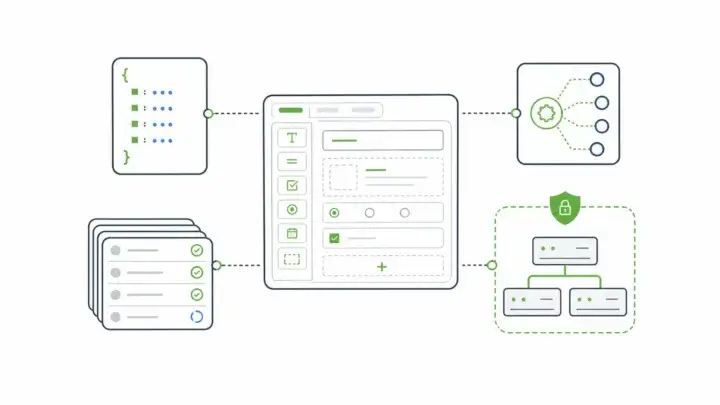
Form.io describes itself as a self-hosted developer productivity platform for building forms, APIs, and workflows. Its “How Form.io Works” page explains that the drag-and-drop builder creates forms and APIs together, that every form and resource has an automatically generated REST API, and that the platform can be embedded in the customer’s own environment (How Form.io Works).
When the buyer needs that layer, Typeform alternatives should not be judged only by design, templates, or monthly response caps.
Where Self-Hosting Changes The Decision

Self-hosting is not automatically required. Plenty of teams are better served by a managed SaaS form tool.
But self-hosting changes the evaluation when forms collect sensitive data, connect to internal systems, support regulated workflows, or sit inside a product your team owns.
IBM’s 2025 Cost of a Data Breach report puts the global average cost of a data breach at $4.4 million (IBM Cost of a Data Breach 2025). The figure is not a form-builder statistic, and it should not be used that way. It is a reminder that data collection boundaries have real financial and operational consequences.
Data-control expectations are also moving into mainstream architecture decisions. BARC’s 2026 data sovereignty survey found that 76% of respondents expect data sovereignty to become more important, which helps explain why “where does this form data live?” is no longer a niche legal question (BARC data sovereignty survey).
Verizon’s 2026 DBIR summary says 31% of breaches now start with software vulnerabilities and 48% involve ransomware (Verizon DBIR 2026). Again, that does not mean a form tool causes the risk. It means buyers should care about where software runs, how it is patched, how access works, and who controls the data path.
For a lightweight survey, a hosted form tool can be perfectly reasonable.
For regulated intake, the questions change:
- Where is submission data stored?
- Can the platform run in our environment?
- Can fields be encrypted where needed?
- Can permissions apply to submissions, not just workspace users?
- Can audit logs show what happened?
- Can dev/test/prod environments support controlled changes?
- Can forms connect to our APIs without routing sensitive data through unnecessary third parties?
Those are infrastructure questions.
Why Form.io Is Different From Most Typeform Alternatives

Form.io is not trying to be a prettier Typeform clone.
The distinction is important.
Form.io is built around the idea that a form can be a governed schema. The form definition can drive rendering, validation, submitted data shape, generated API endpoints, permissions, and workflow actions.
The practical difference shows up in four places.
Forms And APIs Are Connected
In Typeform and many alternatives, the form is mainly a collection surface. You can export data, trigger integrations, or connect webhooks, but the form itself is not usually the application data layer.
Form.io’s model is different. Its builder and platform center on JSON-powered forms and APIs. Form.io’s own product documentation says every form and resource has an automatically generated REST API associated with it.
The model is useful in environments where every new form would otherwise require engineering work to create endpoints, validation, storage, and integration behavior.
Deployment Can Stay Inside Your Environment
Typeform and many alternatives are hosted SaaS products. Some newer alternatives offer self-hosting, especially in the open-source survey category.
Form.io’s self-hosted story is more infrastructure-oriented. Its configuration-based pricing page describes API server environments, enterprise projects, PDF server options, dev/test/prod configurations, self-hosted databases, and security compliance features in API Plus configurations (Form.io configuration-based pricing). Its self-hosted enterprise forms page also frames the Developer Portal, forms, projects, permissions, and submissions as running inside the customer’s own environment (self-hosted forms for enterprise).
The model is a better match for buyers who cannot treat form data as a casual SaaS export.
Governance Is Tied To The Form Layer
Regulated forms often need more than account-level access control. Teams may need form-level permissions, submission-level access, field-level encryption, revision history, action logs, submission revision logs, and audit evidence.
Form.io’s security-compliance materials describe advanced audit logging, action logs, form revisions, submission revision logs, submission collections, field-level encryption, and container security scanning as part of its security module and API Plus feature set (Form.io secure forms compliance readiness).
Broader security frameworks treat control the same way. NIST SP 800-53 treats security and privacy controls as part of organization-wide risk management, not as isolated software checkboxes (NIST SP 800-53 Rev. 5).
Not every Form.io buyer needs every module. The platform is designed for teams that need those questions answered at the form infrastructure layer.
Embedded Form Building Is A Platform Feature
Some Typeform alternatives let you embed a form. Embedding a form is not the same as embedding a governed form-building capability inside your own product.
Form.io can support teams that need form rendering and form building inside their application experience, including white-labeled and tenant-aware scenarios. Its Enterprise Form Builder Module is positioned for exposing a customized form-building experience inside the customer’s own application (Enterprise Form Builder Module).
The distinction is why Form.io becomes relevant to SaaS platforms, government portals, healthcare products, insurance workflows, and financial services onboarding.
A Practical Shortlist Of Typeform Alternatives
Choose Typeform When Presentation Is The Main Requirement
Typeform still makes sense when the primary goal is polished conversational UX, surveys, quizzes, lead capture, and a familiar visual form-building experience. If the form is not regulated, not deeply embedded, and not part of your product architecture, Typeform may be enough.
Choose Tally When Free Limits Are The Issue
Tally fits buyers who want a simpler and more generous free form builder. Its comparison page emphasizes unlimited forms, unlimited responses, conditional logic, file uploads, payments, and API access on lower-cost or free tiers (Tally Typeform alternative).
Choose Fillout When The Issue Is Flexibility
Fillout is worth evaluating for buyers who want modern form building, stronger free response limits, database-style integrations, multi-page forms, and more layout flexibility than Typeform’s one-question-at-a-time format (Fillout vs Typeform).
Choose Formbricks When The Job Is Self-Hosted Surveys
Formbricks fits buyers who want open-source, self-hosted surveys, product feedback, NPS, CSAT, website surveys, or in-app micro-surveys. It is especially relevant for teams that want a privacy-first Typeform alternative but still think in survey and feedback terms (Formbricks Typeform alternative).
Choose Form.io When Forms Become Infrastructure
Form.io is the better fit for buyers who need forms to become part of the application stack: embedded rendering, generated APIs, submission storage, permissions, actions, security/compliance modules, self-hosted deployment, and controlled form lifecycle.
A Form.io customer proof point from Safety Mojo captures the value of the category distinction: “Form.io cleans up all the dirty work and does it for you” (Safety Mojo case study). On G2, another reviewer points to “the level of customization that can go into every form” (Form.io reviews on G2). The value appears after the dirty work expands beyond building a form into keeping forms, data, APIs, and workflow behavior aligned.
The scale proof points point in the same direction. Form.io’s publicplan case study describes support for more than 400 services and 1,000+ forms in a German public-sector context, while the TauRes case study reports an estimated 50% reduction in data-processing workload after standardizing acquisition workflows around Form.io (publicplan case study, TauRes case study).
Decision Framework
Ask these questions before choosing a Typeform alternative:
| Question | If yes, look at |
|---|---|
| Do we mainly need a better free plan or lower-cost form builder? | Tally, Fillout, Jotform |
| Do we mainly need surveys, NPS, CSAT, or product feedback? | Formbricks, SurveyMonkey, Qualtrics |
| Do we need open-source or self-hosted survey collection? | Formbricks, LimeSurvey, HeyForm |
| Do forms need to live inside our application or portal? | Form.io |
| Do submissions need generated APIs, permissions, and audit-relevant controls? | Form.io |
| Do customers or tenants need to build forms inside our product? | Form.io |
| Do we need a simple marketing form this week? | Typeform or a presentation-first alternative |
The strongest decision comes from naming the job.
If the job is presentation, choose a presentation-first tool.
If the job is feedback, choose a survey platform.
If the job is governed application intake, choose form infrastructure.
Key Takeaways
- Typeform is strong for polished conversational forms, surveys, quizzes, and lead capture.
- Many Typeform alternatives compete on price, free response limits, design flexibility, or survey features.
- Self-hosted alternatives become important when buyers need more control over where response data lives.
- Compliance-bound teams need more than a form UX: they need permissions, auditability, deployment control, data routing, and clear responsibility boundaries.
- Form.io is a better fit for embedded, API-backed application infrastructure than for standalone surveys.
FAQ
Which Typeform Alternative Should You Choose?
There is no single universal Typeform alternative. Tally and Fillout are strong for lower-cost form building, Formbricks is strong for open-source and self-hosted surveys, and Form.io is stronger for embedded, API-backed application infrastructure.
Is There A Self-Hosted Typeform Alternative?
Yes. Formbricks is a strong self-hosted survey alternative. Form.io is also self-hosted, but it solves a different problem: governed forms, generated APIs, submissions, permissions, and workflow behavior inside customer-controlled environments.
Is Typeform Good For Regulated Data Collection?
Typeform publishes security and compliance materials and says it can provide a BAA for Enterprise customers in relevant HIPAA contexts. Regulated teams should still verify hosting, data residency, contractual scope, retention, access control, audit, and integration requirements before choosing any hosted form tool.
When Is Form.io A Typeform Alternative?
Form.io is a Typeform alternative for teams whose real requirement is not just a nice form experience, but embedded forms, self-hosted deployment, generated APIs, submission records, permissions, and governed workflow infrastructure.
Is Form.io A Survey Tool?
Form.io can collect survey-like data, but it is better understood as a form and API platform. It is usually a stronger fit for application forms, portals, regulated intake, workflow forms, and customer-facing form infrastructure than for simple standalone surveys.
Which Typeform Alternative Fits Product Feedback?
Formbricks is worth evaluating for product feedback, in-app micro-surveys, NPS, CSAT, and privacy-first survey workflows. It is designed around feedback collection rather than general form infrastructure.
Which Typeform Alternative Fits Embedded Forms?
Form.io is usually the better fit for forms embedded into a customer-facing application and governed as part of the product architecture rather than embedded as standalone survey widgets.
Which Typeform Alternative Fits Compliance-Bound Workflows?
It depends on the compliance requirement. A hosted tool may be enough for low-risk workflows with the right contracts and settings. For stricter control over deployment, storage, APIs, permissions, and audit evidence, Form.io is often the more relevant category fit.
Can Form.io Replace Typeform?
Form.io can replace Typeform when the organization needs self-hosted, embedded, API-backed form infrastructure. It may be too much platform for a simple marketing survey, quiz, or event-registration form.
What Should Developers Compare Before Choosing?
Developers should compare hosting model, schema ownership, API behavior, validation, permissions, submission storage, audit needs, SDK/rendering model, deployment environments, and whether the form needs to live inside an application users already trust.
Final Recommendation
For simple campaigns and surveys, choose the form tool that gets the job done with the least operational burden.
For feedback programs, choose a survey platform with the right data and research workflow.
For regulated intake, embedded portals, tenant-aware SaaS forms, and form-driven application workflows, evaluate Form.io as infrastructure, not as another prettier form builder.
A form is sometimes just a form. But once the data, API, permissions, workflow, and deployment boundary all depend on it, the form has become part of the architecture.
Try Form.io for free to see how self-hosted forms, generated APIs, and governed submission workflows fit inside your application environment.
Try Form.io for free