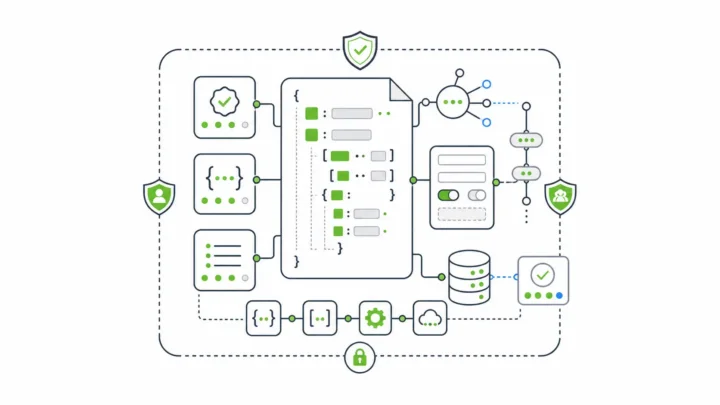
Jotform is a strong hosted form builder for teams that need a form live quickly. But with the average breach now costing a record $4.99 million, regulated teams looking for a Jotform alternative face a different decision. The question shifts from which builder is easiest to which platform gives you enough control after the form is submitted.
The Short Version
Most Jotform alternative lists compare templates, pricing, free plans, conditional logic, integrations, and form design.
Those things matter. They just do not settle the decision for regulated teams.
If your use case is a marketing form, event registration form, internal survey, or lightweight intake workflow, a hosted builder may be the right answer. If your use case is healthcare intake, government services, insurance claims, financial onboarding, customer portals, or embedded SaaS workflows, you need to evaluate a different layer.
For those teams, a serious replacement should be judged by:
- where the platform runs
- who controls submission data
- how authentication and permissions work
- whether forms generate APIs
- whether form and submission changes are auditable
- whether the form builder can be embedded and white-labeled
- whether the platform can fit into the systems you already govern
Form.io belongs in the conversation at that point.
Form.io is not the fastest option for a one-off hosted form. It becomes the stronger fit once forms become part of application infrastructure.
Why Most Jotform Alternative Lists Miss the Regulated Buyer
Most of these search results are written for broad software shoppers.
They usually ask familiar questions:
- Which tool is cheaper?
- Which one has better templates?
- Which one is easier for a nontechnical team?
- Which one has the most integrations?
- Which one has the cleanest form design?
The comparison is useful for simple workflows. It is incomplete for regulated ones.
A hospital intake workflow, public-sector application, insurance claim, KYC onboarding flow, or embedded customer portal cannot be evaluated only by front-end form features. The submitted data becomes part of a larger system. It may need to be retained, corrected, audited, routed, exported, approved, signed, versioned, or tied to a specific policy decision.
The decision moves out of the form-builder category and into the architecture layer.
The right question becomes: can the form platform respect the control surface around the form?
The Real Buying Question: Hosted Builder or Controlled Infrastructure?
There are two different jobs hiding behind the same search.
The first job is form creation. A team needs to publish a polished form, collect responses, and send data somewhere useful. Hosted builders are good at this. They reduce setup time, give nontechnical users a friendly workspace, and make common forms easy to ship.
The second job is governed data collection. Teams need forms to run inside a larger application boundary, use existing authentication, expose durable APIs, preserve record history, and support audit evidence after something changes.
Those are not the same job.
The first job rewards speed. The second rewards control.
Hosted builders are not bad. Regulated teams still need to know when the category changes.
Where Hosted Form Builders Work Well
A hosted form builder can be the right choice when the workflow is narrow and the organization accepts the vendor-managed model.
Use a hosted builder when:
- the form is standalone
- the data does not need to stay inside your own environment
- the workflow can live in the vendor’s dashboard
- standard integrations are enough
- nontechnical creation is more important than developer control
- the form does not need to become part of a product or governed application
Broad comparison lists often recommend tools like Typeform, Google Forms, Tally, Fillout, Cognito Forms, Formstack, FormAssembly, or other hosted builders for this reason. For simple forms, those recommendations can make sense.
Regulated teams should be more careful.
The moment the form sits inside a controlled business process, the tool has to answer questions that template libraries cannot answer.
Where Regulated Teams Need More Than a Hosted Builder

Regulated workflows usually fail at the edges.
The form itself looks fine. The problem appears after submission.
Who can see the data? Which system owns the record? What happens when the form schema changes?
Can a historical submission still be understood against the form version that captured it? Did the webhook fire? Who changed the claim amount, diagnosis note, eligibility field, or approval status?
Can the organization prove it later?
These are ordinary questions in healthcare, government, finance, education, insurance, and other regulated settings.
They also map directly to formal control programs. NIST SP 800-53 Rev. 5 organizes security and privacy controls across families such as Access Control, Audit and Accountability, Identification and Authentication, Incident Response, Risk Assessment, and System and Communications Protection. HHS says the HIPAA Security Rule establishes national standards for electronic protected health information and requires administrative, physical, and technical safeguards. A form platform used in regulated work becomes one of the places those concerns show up.
IBM’s 2026 Cost of a Data Breach Report gives the risk scale: a record global average breach cost of $4.99 million. Verizon’s 2026 Data Breach Investigations Report adds another warning: exploitation of software vulnerabilities now starts 31% of breaches, up from 20% the year before. Regulated teams should evaluate the form platform as software infrastructure as well as a form-design surface.
What a Regulated Jotform Alternative Should Prove
A regulated team should not start with “Which form builder is easiest?”
Start with the control requirements.
Deployment Boundary
Where does the platform run?
For some teams, vendor-managed SaaS is acceptable. For others, sensitive data must remain inside a private cloud, on-premise environment, government-approved network, customer-controlled database, or specific regional boundary.
One of Form.io’s clearest differences is deployment control. Form.io’s self-hosted forms for enterprise model is built so the platform can deploy inside environments the customer controls. The same core surfaces, including form builder, REST API generation, submission handling, and renderer libraries, can run within the customer’s infrastructure.
Deployment shapes data residency, incident response, logging, backup strategy, access review, and compliance ownership. Self-hosted Form.io runs inside your existing security envelope, so it works with your SOC 2 Type II and ISO 27001 programs. Our guide to a self-hosted form builder with APIs deployed in your environment covers the deployment model in depth.
Data Ownership and Submission Control
For regulated teams, a form response is more than a row in a vendor dashboard.
A submission may become a patient record, claim record, case file, intake record, eligibility input, identity artifact, or workflow event. The platform needs to fit the system that owns that record.
Form.io’s architecture stores forms, resources, submissions, users, and project data as JSON documents in the customer’s MongoDB or MongoDB-compatible database. The document model is part of why Form.io can treat form definitions and submission records as application data rather than isolated form entries.
If your team needs application-owned data, the distinction carries more weight than builder polish.
Authentication and Permissions
Regulated forms rarely have one kind of user.
A healthcare intake flow may involve patients, providers, administrators, support staff, and compliance reviewers. A government service workflow may involve applicants, case workers, supervisors, auditors, and external systems. A SaaS product may need tenant admins, end users, implementation teams, and internal support roles.
The platform has to respect those boundaries.
Form.io’s roles and permissions model is built around controlling who can create forms, view submissions, modify data, manage projects, and interact with APIs. The same form infrastructure may support different departments, customers, tenants, or workflow stages.
Permissions are part of the evidence trail, well beyond admin convenience.
Generated APIs
Many hosted form tools expose APIs. API access does not mean the form is the API contract.
The stronger architecture is schema-driven: the same definition that renders the form also defines the submission structure and API behavior around it. Form.io’s form from JSON model gives teams a JSON-based form definition that can render interfaces and support generated APIs from the same source.
The model is useful for forms that feed applications, not just spreadsheets.
It lets developers treat forms as governed application surfaces: forms, resources, submissions, validation, webhooks, and workflow actions can be reasoned about together instead of being scattered across a visual builder, a separate API layer, and custom glue code.
Audit Trails and Revisions
Regulated teams need to know more than whether a form was submitted.
They need to know what changed.
Form.io’s complete audit trail capabilities distinguish between submission revisions and server audit logging. Submission revisions track field-level changes to submitted data. Server audit logging captures system activity such as authentication, form access, API requests, and data modification events.
The distinction is practical. An auditor may need to know that a submission was created by one user, modified by another, and later viewed through a specific role or project context. A support team may need to know whether a webhook ran. A compliance team may need to know which form revision captured a historical record.
For financial services, the requirement is written into regulation. The FTC Safeguards Rule requires financial institutions to monitor and log authorized-user activity and detect unauthorized access, use, or tampering with customer information. It also creates retention and change-management expectations around customer information systems.
Form.io’s secure forms compliance readiness capabilities also include advanced audit logging, action logs, form revisions, submission revision logs, submission collections, and container security scanning as part of the Security Module.
The answer belongs in a different category than “the form has an activity log.”
Embedded and White-Labeled Use

Many regulated forms do not belong on a third-party hosted page.
They belong inside a patient portal, citizen service portal, claims application, financial onboarding flow, education system, or B2B SaaS product.
Embedded regulated forms create two requirements at once: the form needs to feel native to the product, and the form data needs to move through the product’s security and workflow model.
Form.io is designed for embedded use. Developers can render forms inside their own applications, use the platform’s APIs, and let business users modify schemas after the application is in place. For software teams, this is often the useful compromise: developers own the system boundary, while business teams can still manage many form changes without reopening every application ticket.
Comparison Table: Jotform Alternative Categories
| Category | Best fit | Strength | Risk for regulated teams |
|---|---|---|---|
| Hosted no-code form builder | Simple forms, surveys, registration, marketing capture | Fast setup and low technical burden | Data and workflow live primarily in the vendor-managed model |
| Hosted enterprise form suite | Business teams that need more compliance features and admin control | Better security, SSO, compliance options, support | May still be separate from the customer’s application infrastructure |
| Industry-specific form tool | Narrow healthcare, education, legal, or government workflows | Better fit for one vertical’s common use cases | Can be too narrow for cross-department or product-embedded workflows |
| Custom-built forms | Unique internal systems with strong engineering ownership | Maximum control | Expensive to build, secure, document, version, and maintain |
| Self-hosted form infrastructure | Regulated teams where forms are part of real applications | Deployment control, APIs, permissions, revisions, audit evidence, embedded use | Requires technical ownership |
The last row is where Form.io fits.
Form.io is the right answer once a team has outgrown the assumption that forms are standalone assets. If you are weighing whether to build that layer yourself, our guide to build vs buy vs source for enterprise form infrastructure compares the options.
Why Form.io Is Different From a Normal Form Builder
Form.io becomes easier to understand once you stop treating it as a lighter or heavier version of a hosted form builder.
It is infrastructure for forms and the APIs around them.
The visual builder creates schemas. The renderer turns those schemas into forms inside applications. The API server manages forms, resources, submissions, permissions, projects, and actions. The self-hosted deployment model lets the customer run that infrastructure inside their own environment.
Form.io’s own guidance is direct about fit. In Form.io’s article on why teams should not use Form.io without a developer team, the product is framed as infrastructure software for software developers building custom applications, not a simple form builder for nontechnical users. In other words, it is the wrong choice if a marketing team needs a simple form live this afternoon, and the better choice if a software team needs forms to behave like governed application infrastructure.
The honesty is valuable.
The buyer who only wants speed should not be pushed into infrastructure. The buyer who needs control should not be pushed into convenience software that will fail later.
Proof From Real Deployment Work
Form.io’s deployment record backs this up.
Form.io’s public case-study library includes publicplan GmbH, where the project supported more than 400 public-sector services and 1,000+ forms with strict standards and a short timeline. That scale makes it a repeatable public-service infrastructure problem rather than a contact-form problem.
The Department of Justice in Ireland, a public-sector Form.io customer, described its experience this way: “Of all the systems we use to deliver our end products, Form.io has been probably the most straightforward and issue free to use, with excellent support.” Regulated teams are rarely buying a form in isolation. They are buying a form layer that has to connect to the rest of the system.
When Form.io Is the Wrong Jotform Alternative
Form.io is not the right replacement if the team wants the fastest possible hosted form with the least technical setup.
Choose a simpler hosted builder when:
- the form is temporary
- the data is low risk
- the workflow is not part of a product
- the team does not have developers available
- vendor-managed hosting is acceptable
- the organization does not need custom API, identity, or audit architecture
The distinction is buyer fit, not a failure case.
For simple forms, infrastructure can be too much.
When Form.io Is the Right Jotform Alternative

Form.io becomes the stronger answer when the form is part of the system.
One or more of these conditions usually apply:
- submission data must stay inside a controlled environment
- forms are embedded in a customer-facing application
- different users need different permissions
- submissions need to become application records
- the team needs APIs generated from form definitions
- changes to forms and submissions need revision history
- workflows depend on webhooks, actions, approvals, or integrations
- the organization needs audit evidence after submission
- the platform must support multiple teams, tenants, projects, or environments
These are the use cases where “easy form builder” becomes too small a category.
For those teams, Form.io gives the complexity a place to live instead of hiding it: deployment, schema, API, permissions, revisions, audit logs, workflow actions, and application integration.
Key Takeaways
- A broad Jotform alternative list is useful for simple form-building needs.
- Regulated teams need to evaluate deployment boundary, data ownership, permissions, APIs, auditability, and embedded use.
- Hosted builders can work when the form is standalone and vendor-managed storage is acceptable.
- Form.io is strongest once forms become application infrastructure inside customer-controlled environments.
- The right choice depends less on builder polish and more on what must happen after the form is submitted.
FAQ
What Is the Best Jotform Alternative for Regulated Teams?
The best choice depends on the control requirements. If the team only needs a hosted form with better pricing or templates, a simpler hosted builder may be enough. If the team needs self-hosting, APIs, permissions, audit trails, revisions, and embedded application workflows, Form.io is a stronger fit.
Is Form.io Easier to Use Than Jotform?
Not for simple hosted forms. Jotform is easier for nontechnical teams that need to create and publish forms quickly. Form.io is built for teams that need developer control, application integration, self-hosted deployment, generated APIs, and governance around forms and submissions.
When Should a Team Avoid Form.io?
Avoid Form.io when the form is simple, standalone, low risk, and needs to be created by a nontechnical user without developer involvement. Form.io expects technical ownership, especially for self-hosted deployments and production application integration.
Why Would a Regulated Team Outgrow a Hosted Form Builder?
Hosted form builders can become limiting when the workflow needs controlled data residency, internal authentication, custom permissions, API-driven records, audit logs, revision history, or direct embedding inside a product or portal. Those needs turn the form into part of the application architecture.
Is Form.io HIPAA Compliant?
Form.io provides technical capabilities that can support HIPAA-governed workflows in customer-controlled environments, but the customer remains responsible for its compliance program, configuration, policies, deployment controls, and business associate requirements.
Does a BAA Make a Form Workflow Compliant?
No. HHS explains that business associate contracts define permitted uses, safeguards, breach reporting, access, amendment, accounting, subcontractor, and termination obligations. A BAA is important, but compliance also depends on how the workflow is configured, secured, monitored, and governed.
Why Do Audit Trails Matter for Form Submissions?
Audit trails help answer who accessed data, who changed it, what changed, when it changed, and which workflow action ran. For regulated teams, that evidence can matter as much as the original submission.
What Should I Ask Before Choosing a Jotform Alternative?
Ask where data is stored, who controls deployment, how permissions work, whether APIs are generated from the form schema, how revisions are handled, whether audit logs are available, and whether the form can live inside your own application or portal.
Schedule a Call