Organizations comparing self-hosted, open-source builders for internal tools and enterprise forms often put Budibase and Form.io in the same shortlist. Both speak to technical teams that want more control than lightweight SaaS form tools provide, but they solve different layers of the problem.
Budibase focuses on internal operations apps, agents, automations, and workflows around business data. Form.io is designed as application infrastructure for forms, APIs, workflows, and enterprise governance, including agentic workflow patterns where governed forms and submissions need to stay connected to permissions, validation, actions, and audit evidence.
That distinction matters before the feature checklist begins. The question is not whether both products can collect data. It is whether the form is a screen inside an internal app or a governed contract inside the application architecture.
Key takeaways
- Budibase is best understood as an open-source operations platform for internal tools, agents, apps, automations, and connected data.
- Form.io is best understood as form-driven application infrastructure: JSON-defined forms, generated APIs, submission data, permissions, workflow actions, self-hosted deployment, and governed patterns for agentic workflows.
- Budibase is a credible choice for internal apps, request workflows, admin panels, and operational tools.
- Form.io is the better fit when forms need to be embedded in a product, reused across tenants, governed through submission-level permissions, exposed through APIs, managed as part of an enterprise SDLC, or used as structured context for agentic workflows.
- The main question is not "Which product has forms?" It is "What layer do your forms need to own?"
Quick comparison
| Decision area | Budibase | Form.io |
|---|---|---|
| Primary job | Internal operations platform for agents, apps, automations, workflows, and connected data | Form and API infrastructure for embedded, governed, form-driven applications and agentic workflows |
| Form model | Forms are components inside Budibase apps, usually tied to tables, views, custom schemas, or app workflows | Forms are JSON schemas that define UI, validation, submission structure, and backend APIs |
| API model | Public API gives access to apps, users, tables, and data through a RESTful API | Each form/resource path can generate REST endpoints for schemas and submissions |
| Embedding | Published apps can be embedded with iframes; enterprise microfrontend options exist | Renderer and builder can be embedded directly into customer-controlled applications |
| Governance | Tenant roles, workspace roles, app roles, SSO, groups, and audit logs depending on plan | Project, form, and submission permissions; roles, actions, audit patterns, stages, and self-hosted environments |
| Best buyer | Teams building internal tools and operations workflows quickly | Teams standardizing forms, APIs, submissions, permissions, workflow behavior, and agentic workflow context as product infrastructure |
| Wrong fit warning | Less ideal when the form layer must be a portable, governed contract outside an internal app surface | Not a general internal-tools replacement for every dashboard, CRUD app, or admin panel |
What Budibase is good at
Budibase deserves a fair reading. Its own documentation describes it as an open-source platform for internal tools and workflow automation, used by more than 200,000 teams to automate workflows, handle requests, build internal tools, and connect systems using their own data, LLMs, and APIs.
That is a real category.
If your team needs to build an internal approval app, a data-entry screen, an admin panel, a request workflow, an operations dashboard, or an agent-assisted internal process, Budibase is built for that motion. It gives teams a visual app builder, data connections, automations, apps, agents, roles, and deployment options in one operations-oriented surface.
Budibase forms are part of that app-building model. The official forms documentation says forms are built from a Form component, Field group components, and Input components, with optional schemas tied to tables, views, relationships, or custom structures.
That is useful when the form is a screen inside an internal app.
The question is what happens when the form is no longer just a screen.
What Form.io is good at
Form.io is strongest when forms, submissions, validation, permissions, APIs, and workflow actions need to become governed infrastructure rather than app components. The form definition can become a JSON contract that drives rendering, submission shape, validation rules, backend endpoints, and downstream handoffs.
That makes Form.io a better fit for customer-facing forms, regulated intake, tenant-managed SaaS form builders, healthcare and financial workflows, government services, insurance claims, and enterprise processes where the form record needs to stay governed after submission.
It also matters for agentic workflows. When AI-assisted or runtime agents need to collect structured data, validate inputs, trigger actions, or require human confirmation inside enterprise guardrails, the form layer needs stable schemas, permissions, and audit patterns. Form.io is built for that form and workflow infrastructure layer.
So the Form.io category should appear early in the decision: it is not the general internal app builder in this comparison. It is the governed form infrastructure layer when forms, APIs, submissions, and workflow behavior need to be owned by the application architecture.
What changes when forms become infrastructure
Many teams start with a simple internal form and end up with application infrastructure.
The intake form becomes a case creation workflow. The customer form becomes a white-labeled feature inside a SaaS product. The compliance form becomes a regulated submission record. The public-sector form becomes one of hundreds of services that must follow the same standards. The healthcare or financial-services form becomes part of a workflow where validation, access, auditability, and downstream APIs matter as much as the UI.
That is the point where the Budibase vs Form.io decision gets sharper.
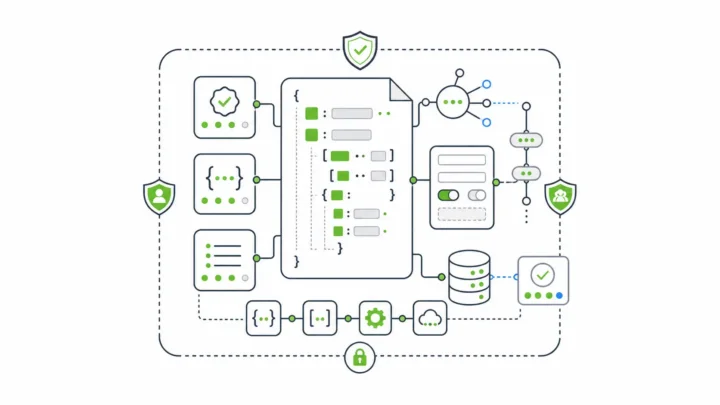
Form.io's form builder is not only a visual form editor. The Form.io documentation says the builder creates a JSON schema representation of the form, and that schema is used to dynamically render the form and automatically generate the REST API that supports it (Form.io form building docs).
That is the architectural difference.
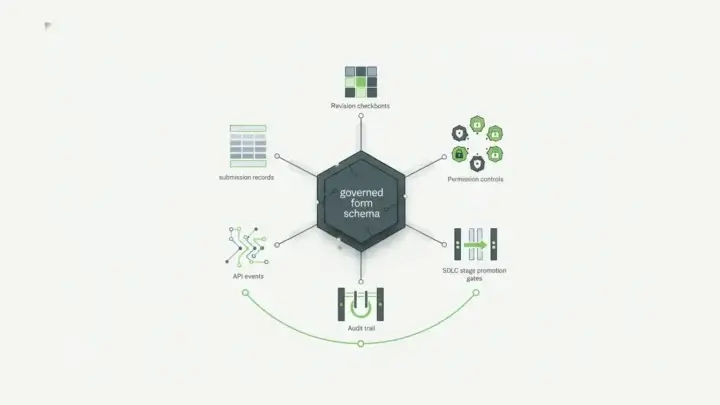
In Budibase, forms help users interact with data inside apps. In Form.io, the form schema can become the contract that defines the rendered UI, validation rules, submitted data shape, API endpoints, permissions, and downstream workflow behavior.
For teams whose forms are application infrastructure, that difference is not small.
Forms inside apps vs forms as contracts
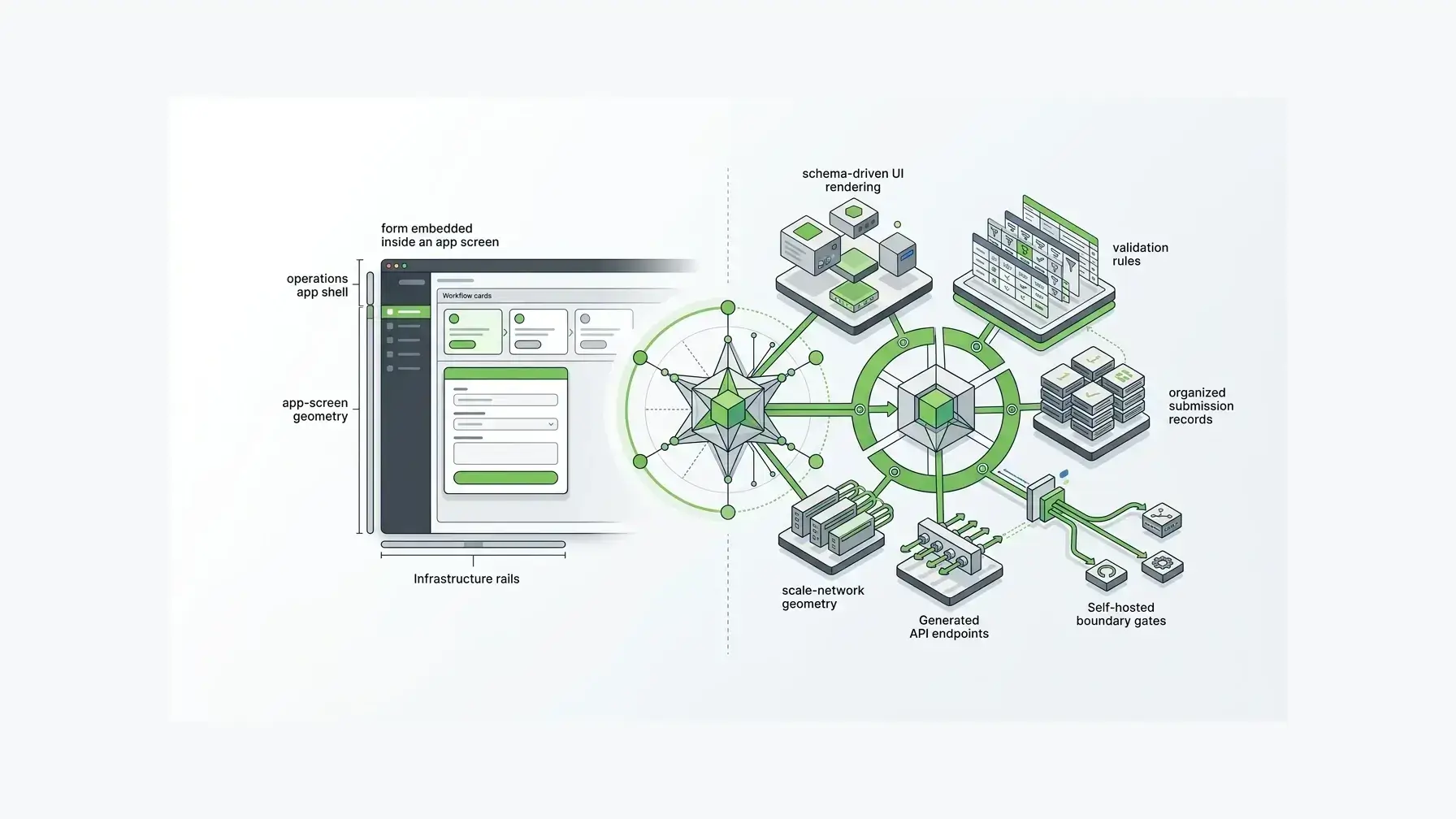
Budibase is strongest when you want a visual way to assemble apps around data and process. Its forms can create and update data, use schemas, and participate in workflows. For internal teams, that can be exactly right.
Form.io is stronger when the form definition itself needs to travel across systems.
Every Form.io form is a structured JSON definition. Form.io's JSON-schema forms documentation explains that a form schema can define the form title, path, type, display mode, components, validation, conditional logic, and submission data shape. It also explains that a form path creates endpoints such as schema retrieval and submission create/list/read/update/delete operations (Forms from JSON).
That matters when multiple applications, teams, tenants, or agents need to rely on the same form contract.
If a form is only a UI on top of a table, the surrounding system still needs to decide how validation is enforced, how submissions are stored, how APIs behave, how permissions apply, and how downstream services consume the data. If the form is a governed schema with APIs and submissions attached, more of that behavior has one source of truth.
That is why Form.io often resonates with teams that have outgrown simple form building. They are not trying to draw fields faster. They are trying to keep the form, data model, API behavior, permissions, and workflow triggers aligned as requirements change.
API and data model comparison
Budibase has an API, and that should be acknowledged clearly. Its public API documentation says the API provides access to applications, users, tables, and data through a RESTful API and an OpenAPI 3.0 specification.
That makes sense for an internal operations platform. You can integrate with the Budibase environment, work with tables and records, and connect Budibase to broader business systems.
Form.io's API model is more specific to form infrastructure. The form schema defines the path and the submission endpoints that support that form. Form.io's drag-and-drop builder and API documentation explains that saving a form registers endpoints for creating, listing, reading, updating, and deleting submissions, with validation enforced from the schema (drag-and-drop form builder APIs).
That is a different center of gravity.
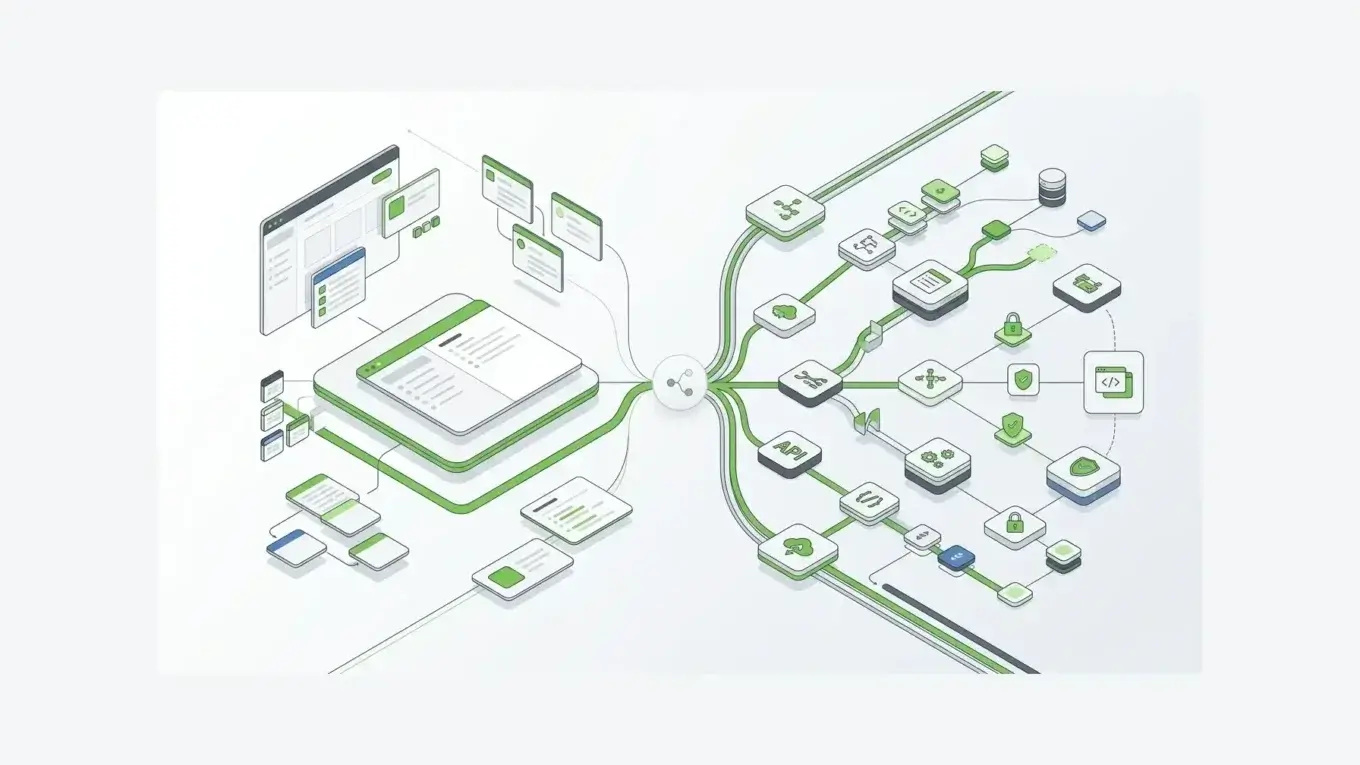
Budibase helps you build apps around data. Form.io helps you define the form and submission layer that creates, validates, stores, and exposes that data in the first place.
For an internal app, either model may work. For a customer-facing product, regulated intake workflow, or multi-tenant form platform, the form-defined API model can be the safer foundation.
Embedding and white-labeling
Budibase supports embedding, but the default model is app embedding. Its embedded app documentation describes embedding a published Budibase app in an iframe, with access considerations for public screens, allowed domains, and authenticated embedded users. Budibase also documents an enterprise microfrontend option for non-iframe embedding in specific licensed scenarios.
That can be useful when the thing you want to embed is an app.
Form.io is built for a different embedding requirement: embedding form rendering and form building inside the application your team already owns. The open-source formio.js renderer and SDK can render JSON schema forms inside an application and communicate with Form.io APIs (Form.io JavaScript renderer). The Enterprise Form Builder Module lets teams expose white-labeled, preconfigured form building inside their own product while controlling components, guardrails, structured data, APIs, permissions, and workflow behavior.
That distinction is important for SaaS platforms, government service portals, healthcare products, and other systems where customers or internal teams need self-service form creation without leaving the product experience.
If you want to embed a whole operational app, Budibase may fit. If you want to embed governed form creation and rendering as part of your own product architecture, Form.io is the more direct match.
Self-hosting, security, and governance
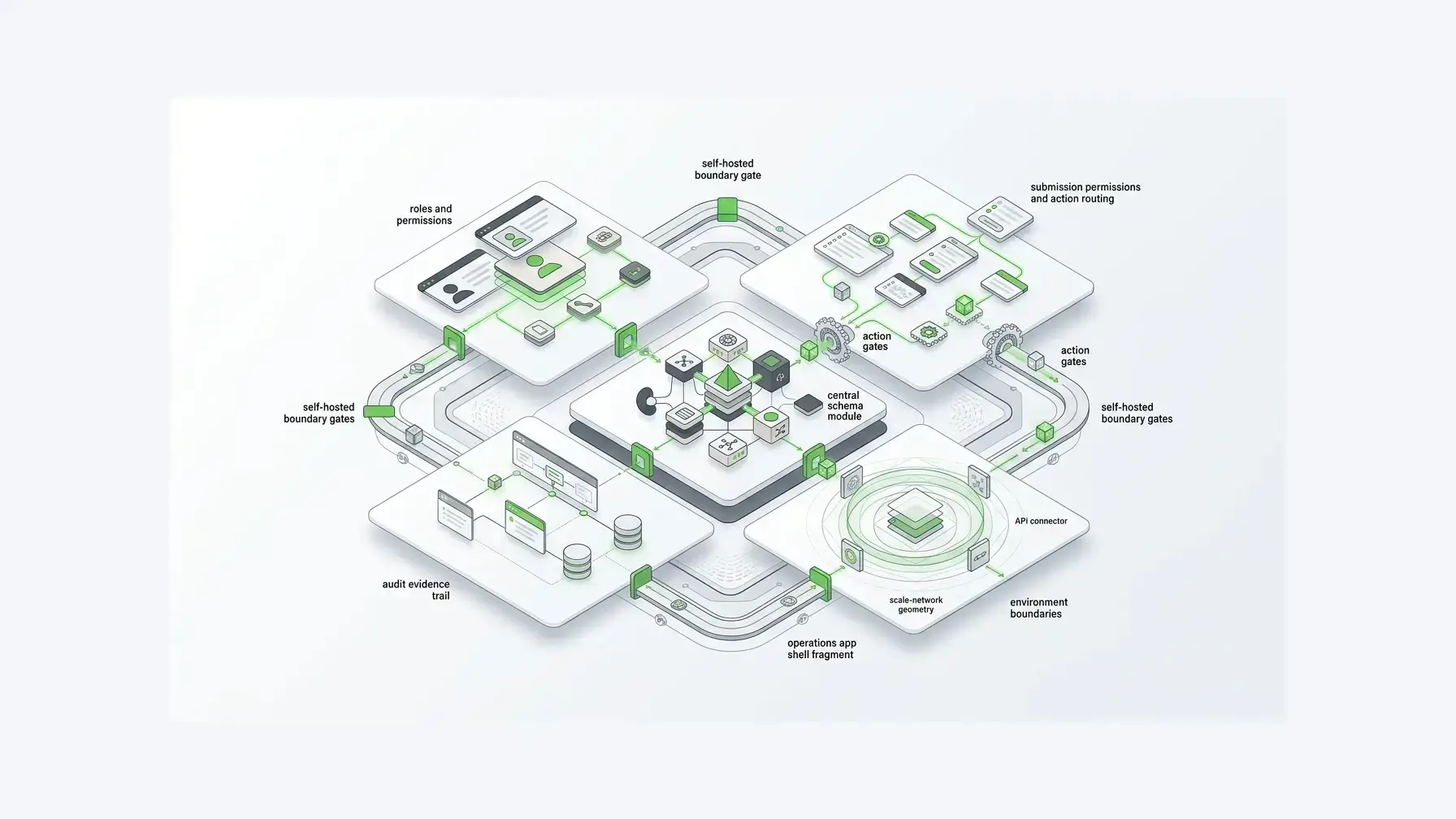
Do not reduce this comparison to "self-hosted vs not self-hosted." Budibase is a legitimate self-hosted option. Its hosting docs describe Budibase Cloud and self-hosted installation paths, including Docker, Kubernetes, and DigitalOcean. Its security docs say the self-hosted version can be deployed inside your own network, on your own servers, with control over how data is secured and without data needing to leave your VPC.
That is real.
The stronger Form.io argument is not that Budibase lacks deployment control. It is that Form.io's control is organized around form infrastructure.
Form.io's self-hosted deployment documentation describes API server environments, portal/authoring environments, Docker-based deployment, and common dev/test/prod structures (Form.io self-hosted deployment docs). Its roles and permissions documentation separates access across project, form, and submission scopes, with permissions governing form definitions and submission data (Form.io roles and permissions docs).
That is the level of detail serious form infrastructure often needs.
Open source is also not a substitute for governance by itself. GitHub's 2025 Octoverse report says 63% of all repositories are open source or public, while 81.5% of contributions happen in private repositories, showing how public software and private enterprise work now depend on each other (GitHub Octoverse 2025). Black Duck's 2026 OSSRA analysis found that 87% of audited codebases contained at least one vulnerability and 78% contained high-risk vulnerabilities, which is why open-source adoption still needs supply-chain governance (Black Duck 2026 OSSRA). Gartner also predicts that by 2027, 70% of organizations with platform teams will include GenAI capabilities in internal developer platforms, increasing the need for reusable guardrails around generated and internal applications (Gartner software engineering trends).
The practical lesson is simple: open source and self-hosting are valuable, but enterprise teams still need clear controls over data, roles, changes, workflows, and audit evidence.
Budibase has governance features such as tenant roles, workspace app roles, SSO, user groups, and audit logs. Its audit log docs say audit logs track events across a Budibase installation, and also show an upgrade path for free-tier users who need audit logs. That is not a criticism. It is a reminder to verify packaging against the controls your team actually needs.
For Form.io buyers, the governance question is more specific: who can change a form definition, who can submit, who can read submissions, which action fires after submission, which environment owns the schema, and which historical submission was governed by which form state?
Those are form-infrastructure questions.
Pricing basis: free tier vs scale predictability

Budibase has a strong pricing story for many teams. Its pricing page includes a free open-source self-hosted plan, and higher tiers add capabilities such as more logs, custom branding, backups, SSO, user groups, SCIM, audit logs, priority support, and air-gapped deployment options.
For internal tools, that can be compelling.
Form.io's pricing story is different. The point is not that it is cheaper in every scenario. The point is that it is priced around self-hosted form/API configuration rather than usage meters. Form.io's configuration-based pricing page lists unlimited API calls, unlimited submissions, unlimited developers and form builders, and unlimited forms and resources in relevant configurations, and it frames the buying model around projects, API/PDF environments, and enterprise add-ons (Form.io configuration-based pricing).
That difference matters when forms are high-volume, public-facing, embedded, or tenant-driven.
If every customer, office, agency, or product team can create forms, usage can become difficult to predict. A pricing model that avoids per-form, per-submission, per-end-user, per-developer, and per-API-call charges can make more sense when forms are infrastructure rather than a handful of internal apps.
Customer proof: when this becomes real
Form infrastructure arguments can sound abstract until the scale shows up.
A Form.io public-sector case study for publicplan GmbH describes support for over 400 services and 1,000+ forms under strict standards and a short timeline (publicplan case study). Another Form.io-hosted customer proof point describes a long-time platform user running multiple production applications with a Form.io backend and saying, "Form.io cleans up all the dirty work and does it for you" (Safety Mojo case study).
Those examples point to the same idea: when forms multiply across services, products, departments, or customers, the hard part is not dragging fields onto a page. The hard part is keeping the form layer governed, reusable, API-backed, and operationally stable.
That is the Form.io case.
When Budibase is the better choice
Budibase is likely the better fit when your team needs:
- internal tools for operations, support, HR, IT, finance, or admin workflows
- agent-assisted internal request handling
- dashboards, admin panels, and CRUD apps over business data
- a visual app builder for teams that want to ship internal workflows quickly
- open-source self-hosting for internal app delivery
- automations and app screens in one operations platform
In those cases, Form.io may be too specialized. If the form is just one component inside a broader internal app, Budibase can be the simpler answer.
When Form.io is the better choice
Form.io is likely the better fit when your team needs:
- embedded forms inside a customer-facing application
- white-labeled form building inside your own product
- JSON-defined forms that can drive rendering, validation, submissions, and APIs
- generated form APIs instead of hand-built backend endpoints for every form
- submission-level permissions and form-specific access control
- dev/test/prod form environments and SDLC-aware form promotion
- multi-tenant form workflows
- compliance-oriented audit patterns
- no per-submission, per-form, per-end-user, or per-API-call pricing surprise
- governed form and submission context for agentic workflows
In those cases, the form is no longer a UI component. It is a governed application layer.
The decision rule
Choose Budibase if the main job is building internal operational apps around data, approvals, automations, and agents.
Choose Form.io if the main job is making forms, submissions, APIs, permissions, workflow behavior, and agentic workflow context part of your product or enterprise application infrastructure.
That is the real comparison.
Budibase helps teams build operational applications faster. Form.io helps teams keep form-driven systems governed when the forms themselves become the architecture.
FAQ
Is Budibase a form builder?
Budibase includes form-building capabilities, but it is better understood as an internal operations platform for apps, agents, automations, workflows, and connected data. Forms are one important part of that app-building model.
Is Form.io a Budibase alternative?
Form.io can be an alternative when the specific requirement is governed forms, submissions, generated APIs, embedded form rendering, and self-hosted form infrastructure. It is not a general replacement for every internal app or dashboard use case Budibase supports.
Which is better for internal tools?
Budibase is usually the stronger fit for broad internal tools, admin panels, request workflows, dashboards, and operations apps. Form.io is more specialized around the form and API layer.
Which is better for embedded forms?
Form.io is usually the stronger fit when forms need to be embedded into a customer-facing product or internal application as a governed runtime. Budibase can embed apps, but Form.io is built around embeddable form rendering and embedded form building.
Can Budibase be self-hosted?
Yes. Budibase supports self-hosting and documents deployment paths such as Docker, Kubernetes, and DigitalOcean. Buyers should still verify which governance, audit, SSO, SCIM, support, and air-gapped features are included in the plan they intend to use.
Can Form.io be self-hosted?
Yes. Form.io supports self-hosted deployment with API server environments, portal/authoring environments, Docker-based deployment, customer-controlled databases, and common dev/test/prod structures.
Does Budibase generate APIs from forms?
Budibase has a public API for apps, users, tables, and data. Form.io's distinction is that form schemas and paths can directly define form and submission endpoints, making the form itself part of the API contract.
Which is better for regulated form workflows?
Form.io is usually the better fit when the regulated workflow depends on form schemas, submission permissions, generated APIs, deployment boundaries, audit patterns, and long-term governance of form changes. Budibase may still fit internal regulated workflows when the app-builder model is enough.
Which is better for customer-facing SaaS platforms?
Form.io is usually the stronger fit when SaaS customers need to create or use forms inside your product experience, especially with white-labeling, tenant boundaries, and governed form behavior. Budibase is stronger when the goal is to build internal apps for your own team.
How should teams evaluate Budibase vs Form.io?
Start by deciding whether you are choosing an internal app builder or a form infrastructure layer. Then compare deployment, embedding, API behavior, permissions, pricing basis, audit needs, and who will maintain the form model over time.
Build form infrastructure without turning every form into a custom project
When forms become part of the application architecture, the right platform needs to do more than render fields. It needs to keep schemas, submissions, APIs, permissions, and workflows aligned as the system grows.
Try Form.io for free if your team needs self-hosted form infrastructure that developers can embed, govern, and scale inside the applications you already own.
Try Form.io for free