Your design team just shipped an updated component library. New focus rings, refined spacing, updated color tokens. Engineering updates the React components, the dashboard layouts, and the navigation. Everything looks cohesive.
Then someone opens a form.
Form.io has been powering your dynamic forms beautifully. It handles complex conditional logic, multi-step workflows, and validation rules that would take many engineering hours to build from scratch. The form builder itself is invaluable: non-technical team members can create and modify forms without engineering involvement.
But visually, those forms still use the Bootstrap classes and markup they shipped with. Now there’s a mismatch. The rest of your application has evolved, and the forms haven’t.
This isn’t a Form.io problem. It’s a sign of success. Your product has matured to the point where your design system requirements go beyond any form builder’s defaults.
Why This Happens
Form.io ships with professional, well-designed templates based on Bootstrap, and that’s exactly what you want when you’re getting started. These defaults handle everything: inputs, buttons, radio groups, validation messages, error states. They’re accessible, well-tested, and work across browsers. For many teams, they’re perfect and require no customization at all.
But as your product matures, specific visual requirements tend to surface. Maybe your design system has standardized on Tailwind rather than Bootstrap. Maybe you’ve built up custom brand colors, spacing scales, and typography, or your design team has defined particular interaction patterns. And at some point, “close enough” stops being good enough. You need the forms to match the rest of your application pixel-for-pixel. That’s the moment you need to customize Form.io’s visual layer while keeping everything else that makes it valuable.
What Teams Try Today
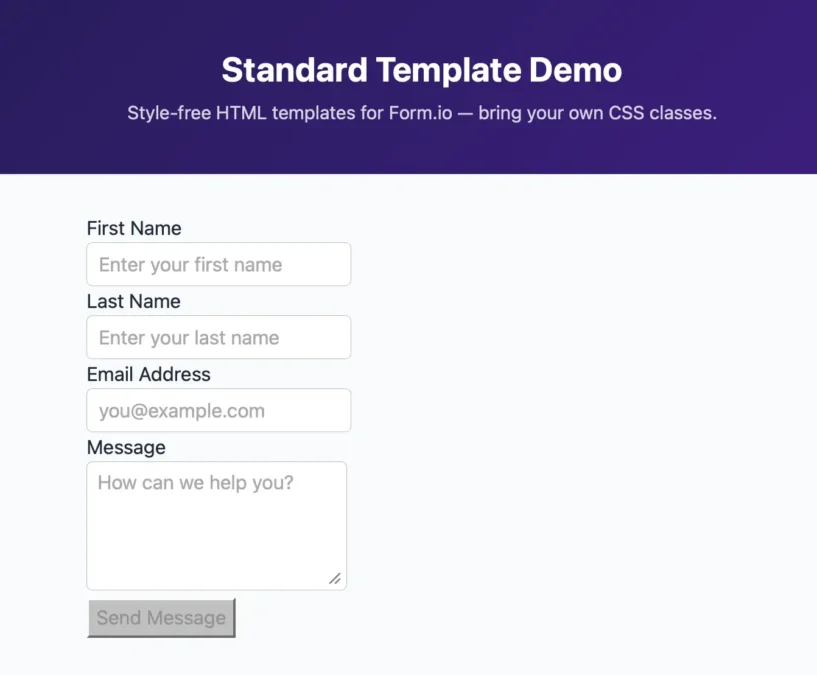
When teams hit this point in their product evolution, they usually reach for one of four approaches. Each comes with real trade-offs.
- Convince design to accept the form builder’s defaults. Sometimes that works for internal tools, but for a customer-facing product with established brand guidelines, it’s usually a non-starter.
- Write custom CSS that overrides the defaults. This works until it doesn’t: you can change colors and spacing, but you can’t restructure HTML with CSS, future updates might break your overrides, and maintenance gets expensive.
- Rebuild the component templates from the ground up. You could use the default Form.io Bootstrap 5 template as a guide for writing your own. That gives you complete control, but now you’re maintaining even more code. It’s technically possible, but operationally expensive.
- Build a custom form system from scratch. The most drastic option. Do this and you throw away Form.io’s conditional logic, validation rules, and visual builder, everything that made it valuable in the first place. It’s rarely justified. You chose Form.io for a reason.
What most teams actually want is something none of those quite delivers: keep Form.io’s powerful form logic and builder interface, but adapt the visual layer to match their design system.
The Standard Template
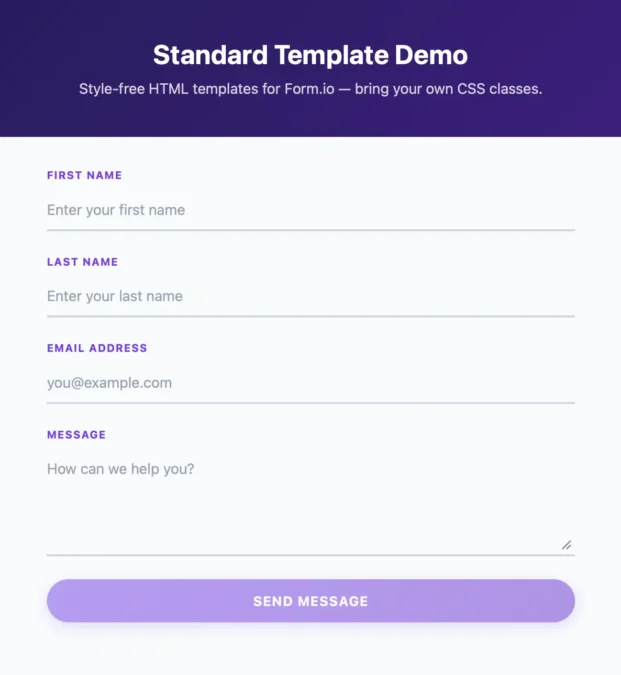
The Standard Template introduces a customization system that works with Form.io’s existing architecture instead of against it. Its core mechanism is Style Map: you replace the CSS classes on existing HTML elements without changing the underlying structure. It works with any CSS framework, whether that’s Tailwind, Bootstrap, or a fully custom design system, and it’s fast to implement and easy to maintain. With the Standard Template, you’re configuring Form.io’s rendering layer, not fighting it.
This approach makes sense when you have an established design system with specific requirements, several forms that need to stay visually consistent, and a product where design system compliance matters, and you want all of that without giving up Form.io’s form logic and builder.
Just as important is knowing when you don’t need it. If Form.io’s default Bootstrap theme already works for you, if you only have a form or two, if your forms are internal tools where strict visual consistency isn’t a concern, or if you’re just getting started and should be optimizing for speed over pixel-perfection, then reaching for customization only creates work. Form.io’s defaults are professionally designed and serve most use cases well. Don’t make work for yourself unless you have a clear requirement.
Wrapping Up
Adopting the Standard Template gives you the best of both worlds: Form.io’s powerful form capabilities with your design system’s visual consistency. Once it’s in place, your forms match your design system’s colors, spacing, and typography, while non-technical users keep building and modifying forms in the Form.io builder exactly as before. All of Form.io’s logic, validation, conditionals, and calculations keep working, your maintenance burden shrinks to a set of class definitions and the occasional template override, and new Form.io features and updates apply without conflicts.
The Standard Template is now available with the release of Form.io 9.8.0.
In Part 2, I’ll show you how class overrides work with concrete examples. You’ll build a complete Tailwind theme from scratch without touching a single line of HTML.