When developers search for form automation solutions, they encounter a confusing landscape. Google Forms appears alongside enterprise form builders. Typeform competes with Retool. Jotform markets to the same audience as platforms that require MongoDB deployments. The category “form builder” has become meaningless because it groups together tools that solve fundamentally different problems for fundamentally different users.
Form.io exists in this space but operates on different assumptions. Understanding what those assumptions are, and why they matter, helps you determine whether Form.io belongs in your evaluation or whether a simpler tool serves your actual needs better.
The Consumer Form Builder Category
Google Forms, Typeform, and Jotform occupy the consumer and small business segment of form automation. Their value proposition centers on accessibility: anyone can create a form without technical knowledge, distribute it via link or embed, and collect responses in a managed database or spreadsheet.
Google Forms optimizes for speed and zero friction. You create a form in minutes, share a link, and responses flow into Google Sheets. There is no setup, no deployment, no configuration. The tradeoff is limited customization, basic conditional logic, and forms that look like Google Forms regardless of your brand.
Typeform differentiates on user experience. The one-question-at-a-time interface creates a conversational feel that increases completion rates for surveys and lead capture. The design is polished. The templates are extensive. The tradeoff is that you are paying for aesthetics and engagement metrics, not for data infrastructure or developer tooling.
Jotform sits between these poles with broader feature coverage: payment processing, more field types, PDF generation, and integrations with common business tools. It handles more complex use cases than Google Forms while remaining accessible to non-technical users.
These tools share a common architecture. You build forms in their interface. Data lives in their database. Integrations happen through their connection layer. Your application, if you have one, interacts with their API to pull data after submission. The form is a separate service your users visit, not a component embedded in your application.
This architecture works well when forms are standalone data collection points. Marketing surveys. Event registrations. Contact forms. Lead capture. Situations where the form exists independently from any larger application context.
The Internal Tool Builder Category
Retool, Appsmith, and similar platforms solve a different problem. They help developers build internal applications quickly by providing pre-built UI components, database connectors, and a visual development environment. Forms are one component type among many: tables, charts, buttons, modals.
Retool’s value proposition is speed for internal tools. Instead of building an admin panel from scratch, you drag components onto a canvas, write SQL queries to populate them, and deploy an internal application in hours instead of weeks. The forms within Retool connect directly to your database. You write the queries. You control the schema.
The tradeoff is that Retool builds applications, not reusable form infrastructure. Each Retool app is a distinct artifact. The forms within it are not portable, not embeddable in external applications, and not designed for end-user-facing contexts. Retool optimizes for internal operations teams, not for customer-facing data collection at scale.
Retool also requires developers. Despite the visual interface, you write SQL, JavaScript, and configure integrations. This is appropriate for its target audience (internal tool development by engineering teams) but means it does not solve the “business users building forms without code” problem that drives adoption of consumer form builders.
Where Form.io Actually Fits
Form.io occupies a category that neither consumer form builders nor internal tool platforms address: forms as embeddable infrastructure for bespoke applications.
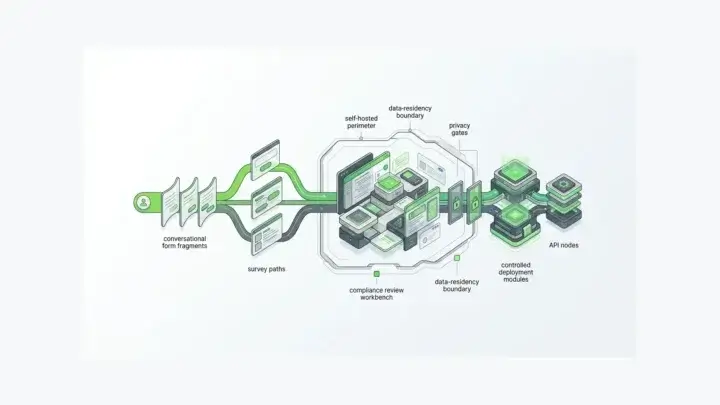
The distinction matters at the architecture level. Consumer form builders host your forms and data on their infrastructure. You visit their service to build forms, and users visit their service (or an iframe) to complete them. Internal tool builders create standalone applications that happen to include forms. Form.io provides a form and API platform that deploys inside your infrastructure and integrates directly into applications you are building. That level of integration means form automation capabilities, third-party connections, automated data flows, and so forth are within reach.
When you drag components onto a Form.io form, you are not just creating a UI. You are defining a JSON schema that simultaneously describes the form’s appearance, validation rules, and the API structure for submissions. The form builder generates both the frontend component and the backend API in a single operation. This is what “forms + APIs” means in practice.
The platform deploys as Docker containers connected to your MongoDB instance. You control the infrastructure. Data never leaves your environment unless you send it somewhere. This matters for regulated industries, enterprise security requirements, and organizations that cannot accept third-party data hosting.
The JavaScript renderer embeds directly in Angular, React, Vue, or vanilla JavaScript applications. No iframes. No redirects to external services. The form appears as a native component in your application, styled with your CSS, authenticated through your session management, and submitting to APIs running in your environment.
Different Problems, Different Tools
The “which form builder should I use” question has no universal answer because the question conflates different problems.
If you need a survey or feedback form that exists independently, Google Forms or Typeform is probably correct. They are faster to set up, require no infrastructure, and optimize for the standalone form use case. Typeform if completion rates and design matter. Google Forms if cost and simplicity matter.
If you need internal admin tools that query your database and let operations teams manage data, Retool or similar platforms make sense. They optimize for that specific workflow and provide components beyond forms that internal tools require.
If you are building an application where forms are embedded data collection components that feed into application logic, where the form schema defines your data model, where you need the form builder to produce reusable form definitions that render across web and mobile, where forms update independently of application deployment cycles, and where data and infrastructure must remain under your control, then Form.io addresses requirements that the other categories do not.
What Form.io Requires That Others Do Not
Form.io assumes you have a development team. The platform provides the form building, API generation, and rendering infrastructure, but you integrate that infrastructure into an application you are building. If you do not have an application, if you are not planning to build one, Form.io solves a problem you do not have.
Installation means deploying containers and configuring MongoDB. The Form.io GitHub repository provides the open source core, and enterprise features require licensing. You manage upgrades, scaling, and operations for your deployment. This is infrastructure you own, with the responsibilities that ownership entails.
The learning curve involves understanding JSON schemas, the relationship between forms and Resources, how Actions work as middleware [(/features/form-actions)], and how the renderer integrates with your frontend framework. The documentation and API reference are comprehensive, but you will spend time learning the platform’s concepts before becoming productive.
Pricing does not scale with usage. Form.io charges per project and per environment, not per form, per submission, or per user. This makes cost predictable for high-volume applications but means the economics only make sense at sufficient scale. A contact form collecting 50 submissions per month does not justify Form.io’s complexity. An enterprise application processing thousands of structured data submissions across multiple tenants begins to reveal why the infrastructure approach matters.
The “Low-Code” Distinction
Form.io sometimes appears in low-code or no-code platform comparisons, but the categorization obscures more than it clarifies.
Consumer form builders are no-code tools. Business users create forms without developer involvement. The platform handles everything.
Internal tool builders like Retool are low-code. Developers use visual interfaces but write queries and logic. The visual layer accelerates development without eliminating code.
Form.io is what the company calls “pro-code/low-code.” The form building interface is visual and accessible to non-developers. Business users can create and modify forms without code changes. But the platform itself deploys into a developer-managed environment. Integration requires code. Custom components require code. The platform accelerates form development while remaining firmly developer-infrastructure.
This post articulates the position directly: Form.io is not an application development platform (ADP) in the traditional sense. Your developers still build the application. Form.io handles the forms, their APIs, and the submission infrastructure so developers do not have to build that layer from scratch.
When Consumer Form Builders Break Down
Consumer form builders work until your requirements exceed their assumptions. Common breaking points include:
Nested and repeating data structures. A form that collects multiple addresses, or line items with variable quantities, or hierarchical data that maps to document structures rather than flat rows. Consumer form builders flatten everything into spreadsheet-compatible formats. Form.io preserves nested JSON structures because MongoDB stores documents, not rows.
Application integration beyond webhooks. If your application needs to render forms dynamically, prepopulate data from user context, validate against business logic before submission, or respond to submission events within application flow, iframe-based embedding and webhook integrations become limiting. Form.io’s renderer operates inside your application context with full access to application state.
Multi-tenant deployments. SaaS platforms that need to provide form building to their own customers, with data isolation between tenants, and white-labeled interfaces, cannot accomplish this with tools designed for single-organization use. Form.io’s multi-tenancy architecture supports these hierarchical structures.
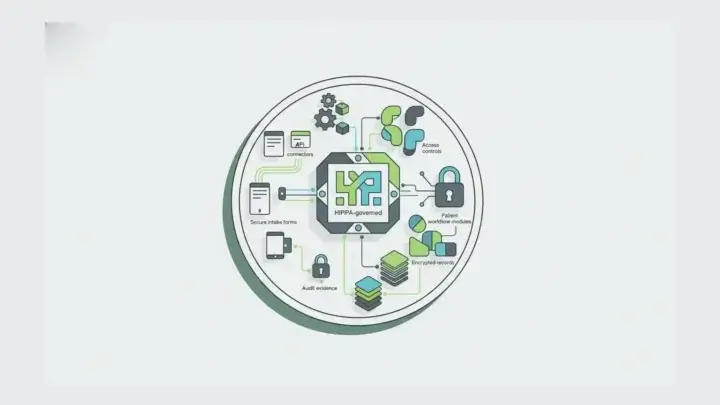
Compliance and data residency. HIPAA, FedRAMP, GDPR data residency requirements, or organizational security policies that prohibit third-party data hosting eliminate consumer form builders from consideration regardless of their features. Self-hosted Form.io deployments keep data in environments you control.
Complex conditional logic and validation. Consumer form builders offer show/hide logic and basic validation. When you need validation rules that query external APIs, conditional flows that span multiple pages with draft saving, or business logic that exceeds what simple condition builders express, you need programmable form infrastructure.
When Form.io Is Overkill
Form.io is overkill when simpler tools solve your actual problem.
If your forms exist independently and do not integrate into an application, consumer form builders are faster and cheaper. The infrastructure overhead of Form.io provides no benefit when forms stand alone.
If you need internal admin tools for your team, Retool or similar platforms optimize for that workflow with features Form.io does not prioritize.
If you are evaluating form solutions for a project that does not yet have committed developer resources, the platform’s dependency on technical implementation becomes a blocker rather than an enabler.
If your organization cannot support self-hosted infrastructure, the operational requirements exceed what your team can maintain. Form.io’s SaaS offering exists but the platform’s design assumes self-hosted deployments for enterprise use cases.
If your forms collect survey data that exports to spreadsheets for analysis, the JSON document model and MongoDB storage add complexity without corresponding benefit.
The Infrastructure Mental Model
The category confusion around Form.io dissolves when you adopt the infrastructure mental model. Consumer form builders are SaaS services you use. Internal tool platforms are application builders. Form.io is infrastructure you deploy, like a database or authentication service.
You do not compare PostgreSQL to Airtable even though both store data. You do not compare Auth0 to a simple password field even though both relate to authentication. Similarly, comparing Form.io to Google Forms based on the presence of drag-and-drop form building obscures that they occupy different layers of the technology stack.
Form.io’s positioning as “forms as infrastructure” reflects this distinction. The platform provides form rendering, schema management, submission APIs, and action pipelines as services your application consumes. You choose this approach when forms are a core component of applications you are building, when you need the control and integration depth that infrastructure ownership provides, and when you have the technical resources to deploy and maintain that infrastructure.
The companion piece on why Form.io is not Google Forms / Typeform / Retool explores these distinctions in technical detail. For now, the key takeaway is categorical: Form.io belongs in evaluations alongside embeddable form infrastructure, not alongside SaaS form services or visual application builders.
Related Resources
- Why Form.io Requires MongoDB explains the data model implications
- Form Schemas vs Submissions covers the JSON schema architecture
- Why Form.io Is Infrastructure, Not an App Builder elaborates the infrastructure positioning
- Why You Should Not Use Form.io Without a Dev Team addresses the developer requirement directly
- formio/formio on GitHub provides the open source core