Form.io is not a form builder for non-technical users. It is an OEM form runtime designed for software developers who are building custom applications. If you are looking for a tool where marketing can create forms without involving IT, Form.io is the wrong choice. If you need a form live this afternoon and nobody on your team can write JavaScript, Form.io will not help you.
This is not a limitation. It is the design. Form.io solves a different problem than tools like Google Forms, Typeform, or Jotform. Understanding this distinction will save you months of frustration and thousands of dollars in failed implementation.
Form.io Requires Developers at Most Stages
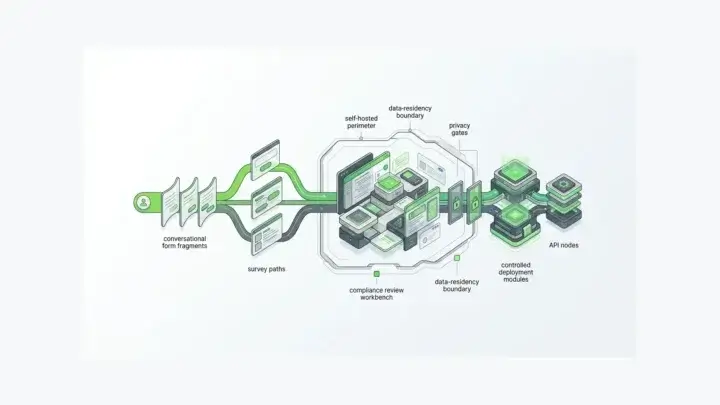
Form.io’s architecture assumes that developers are involved in initial setup, ongoing integration, and production deployment. Here is what each of those stages requires.
Initial setup requires:
- Deploying Docker containers to your infrastructure (if self-hosted)
- Configuring MongoDB or a MongoDB-compatible database
- Setting up environment variables for authentication, CORS, and API secrets
- Integrating the Form.io JavaScript renderer into your application
- Building the application UI that wraps the rendered forms
Ongoing integration requires:
- Writing code to handle form submissions in your application logic
- Implementing authentication flows using JWT tokens, OAuth, or SAML
- Connecting forms to your existing databases and services via webhooks or custom actions
- Building custom components when the standard component library does not meet your requirements
- Managing the project hierarchy and permission structure
Production deployment requires:
- Monitoring container health and database performance
- Managing SSL certificates and load balancers
- Handling upgrades when Form.io releases new versions
- Troubleshooting API issues and submission failures
- Scaling infrastructure as form volume increases
None of these tasks can be completed by someone who cannot read code or manage servers. If your organization expects to hand Form.io to a business analyst and have them fully integrate forms in production applications, that expectation is incorrect.
See the deployment guide for a detailed look at what self-hosted installation involves. If reading that documentation feels like reading a foreign language, Form.io is not for you.
However, it’s worth noting that for many cases developers themselves do not need to be the ones building the forms. You can hand Form.io’s developer portal to a power user who will be able to build complex, drag and drop forms without having to code.
The Drag and Drop Builder Does Not Replace Development
Form.io has a visual drag and drop form builder. This creates a misconception that Form.io is a low-code or no-code tool. It’s not.
The builder’s primary function is to create JSON schemas. It does not create the application that displays those forms. It does not build the page layout that surrounds the form. It does not route submission data outside of itself without custom development.
What the builder does:
- Provides a visual interface for constructing form schemas
- Generates the JSON that the Form.io renderer interprets
- Allows configuration of validation rules and conditional logic
- Enables non-developers to modify forms after developers set up the system
What the builder does not do:
- Create applications
- Build database integrations
- Design page layouts (though there are some limited layout components)
- Replace development work in totality (though it replaces a lot)
The builder is useful because it allows product managers, business analysts, or customer success teams to modify forms without pulling developers off other work. But those non-technical users can only do this after developers have built the application infrastructure that hosts and renders those forms.
Think of it this way: the builder lets you edit a form that already exists in an already-running application. A developer had to build that application first.
What Breaks Without Technical Staff
If you deploy Form.io without adequate developer support, here is what will go wrong.
Database issues will stop everything. Form.io requires MongoDB. When queries slow down, when indexes need optimization, when storage fills up, when replication fails, you need someone who can diagnose and fix MongoDB problems. Without that person, your forms stop working and your submissions become inaccessible.
Container failures will cause downtime. The Form.io Enterprise server runs as a Docker container. Without someone who understands containerized applications, you cannot keep the system running reliably.
Integration failures will block business processes. Form.io sends data to other systems via webhooks and integrations. When those integrations fail, submissions pile up, business processes stall, and someone has to debug the connection. That person needs to understand HTTP requests, authentication tokens, and API error responses.
Authentication problems will lock out users. Form.io supports multiple authentication methods: JWT tokens, OAuth providers, SAML, and custom authentication. When users cannot log in, when tokens expire unexpectedly, when SSO breaks, someone needs to trace the authentication flow and identify the failure point. This requires reading code and understanding authentication protocols.
Custom requirements will not be met. Every organization eventually needs something that Form.io does not provide out of the box. A specific calculation logic. A custom validation rule. A unique component type. Meeting these requirements means writing code. Without developers, custom requirements become blockers.
Upgrades will be ignored or fail. Form.io releases updates regularly. Applying those updates requires pulling new Docker images, testing for compatibility with your customizations, and managing database migrations. Organizations without technical staff either skip updates (accumulating technical debt and security vulnerabilities) or attempt updates and break their systems.
These are not edge cases. They are certainties. Form.io is infrastructure software. Infrastructure software requires operational expertise.
Who Should Not Use Form.io
Marketing teams creating standalone forms: If you need a contact form on your website or a survey for customer feedback, use Typeform, Google Forms, or Jotform. These tools create embeddable forms without technical integration work. Form.io is overkill for standalone forms.
Small businesses without IT staff: If your company has fewer than five employees and no one with a software development background, Form.io will consume more resources than it provides. The time spent trying to deploy and maintain Form.io would be better spent using simpler tools.
Organizations expecting immediate results: Form.io deployments can be done in a day, but full implementations and integrations into your business processes can take weeks to months, not hours. The initial deployment, integration, and testing require sustained developer attention. If you need forms working tomorrow and you are starting from scratch today, Form.io is not the right choice.
Projects with no budget for ongoing technical support: Form.io delivers rock-solid stability and is trusted by governments, global banks, and the most demanding business verticals, but it’s not a set-and-forget tool. It provides monthly releases and requires ongoing updates.
Teams looking for an alternative to hiring developers: Sometimes organizations evaluate Form.io hoping it will eliminate the need for developers altogether. It will not. Form.io significantly reduces developer time spent on form-specific code and deployments, but it does not eliminate the need for developers. If you cannot hire developers, Form.io does not solve your problem.
For comparison with consumer form tools, see Why Form.io Is Not Google Forms, Jot Form, Typeform, or Retool.
Who Should Use Form.io
Form.io is the right choice for organizations with development teams building form-intensive applications. If any of the following describe you, Form.io probably fits.
Software companies building SaaS products: You have developers. You are building a custom application. You need forms throughout your product. You want to stop writing form rendering and submission handling code for every form. Form.io gives you schema-driven data capture that your developers can integrate once and use everywhere.
Development agencies building client applications: You build custom applications for clients repeatedly. Many of those applications involve complex forms. You want a repeatable system for form management across projects. Form.io provides that system, and your developers can use it across multiple client engagements.
Enterprise IT teams building internal applications: You have a development team responsible for internal business applications. Those applications involve data collection, workflow management, and approval processes. You want to empower business users to modify forms without developer involvement for every change. Form.io allows that division of labor after initial setup.
Organizations with strict data compliance requirements: You must keep form data in your own infrastructure for regulatory reasons. You cannot use SaaS form tools that store data on third-party servers. Form.io deploys into your environment so data never leaves your control. But you need developers to deploy and manage it there.
The common thread: all of these organizations have technical staff who can deploy, integrate, and maintain Form.io. The question is not whether you want a form builder. The question is whether you have the technical resources to operate forms as infrastructure.
The Minimum Technical Team
What is the minimum technical capability required to use Form.io successfully?
For self-hosted deployments:
- At least one developer familiar with Docker containers and container orchestration
- Database administration capability for MongoDB
- Backend development skills in Node.js or equivalent for building integrations
- Frontend development skills in React, Angular, Vue, or vanilla JavaScript for application integration
- DevOps capability for managing environments, deployments, and monitoring
For SaaS deployments (Form.io hosted):
- Frontend development skills for embedding forms in your application
- Backend development skills for handling webhooks and building integrations
- Understanding of REST APIs and JSON data structures
- Ability to read and write JavaScript
Even with Form.io’s SaaS offering (which handles infrastructure for you), you still need developers to build the application that uses Form.io. The hosted option reduces operational burden but does not eliminate the need for technical staff.
Part-time technical support is usually insufficient. Form.io implementations are not one-time projects. They require ongoing attention. Plan for dedicated technical ownership or recognize that you will accumulate problems faster than you can solve them.
The Cost of Ignoring This Advice
Organizations that deploy Form.io without adequate technical resources follow a predictable trajectory.
Months 1-3: Excitement about the drag and drop builder. Non-technical staff create forms. Everything seems to work. The system appears simpler than expected.
Months 4-6: First integration issues emerge. Webhooks fail intermittently. Performance degrades as submission volume increases. Nobody understands why, and nobody can fix it. Workarounds accumulate.
Months 7-12: The system becomes unreliable. Business users lose trust. Critical forms fail at critical moments. Leadership questions the decision. Someone suggests migrating to Typeform or Google Forms “just to get something that works.”
Months 12+: The organization either invests in proper technical support (often through expensive consultants because the original team lacks the expertise) or abandons Form.io entirely, writing off the implementation investment.
This trajectory wastes six to twelve months and significant budget. It also damages internal trust in technology decisions and makes future enterprise software implementations harder to advocate for.
The honest assessment is this: Form.io is powerful infrastructure for the right organization. Deploying it without the right technical resources is like buying a commercial kitchen when you need a microwave. The capability is there, but you cannot use it, and you have spent far more than necessary for what you actually need.
Alternatives If You Do Not Have Developers
If you have read this far and recognize that your organization lacks the technical resources for Form.io, here are better options.
For simple surveys and feedback forms: Google Forms is free and works immediately. Typeform creates visually engaging forms with conditional logic. SurveyMonkey handles more sophisticated survey requirements. None of these require technical integration.
For forms embedded in marketing websites: Jotform, Wufoo, and Formstack create embeddable forms with visual builders and handle data storage. They integrate with common marketing tools without code. You can have a working form in an hour.
For forms in internal business processes: Microsoft Forms integrates with Office 365 and SharePoint. Google Forms integrates with Google Workspace. If your organization already uses these platforms, the form tools are available and require no additional deployment.
For application building without code: Retool, AppSheet, and similar platforms let non-developers build internal applications with forms. They handle data storage, user authentication, and application hosting. The tradeoff is limited customization compared to developer-built applications.
These alternatives involve tradeoffs. They may not support your specific integration requirements. They may not meet compliance needs. They may not scale to your volume. But they work without developers, which means they actually work for organizations that lack developers.
Form.io is the right choice when those alternatives cannot meet your requirements and you have the technical team to operate it. If the alternatives work for you, use them. The best tool is the one you can actually operate.
Related Documentation
- Why Form.io is Infrastructure as a Forms Solution, Not an App Builder
- Why Form.io Is Not Google Forms, Jotform, Typeform, or Retool, But Instead a Developer-First Approach to Form Automation
- Self-Hosted Deployment Guide
- Form.io GitHub Repository
- API Documentation
Related Features
- Drag & Drop Form Builder: What the builder does and does not do
- Authentication Support: Technical requirements for authentication
- Integrations: What integration setup involves
- Fully Deployed: Self-hosted deployment requirements
- Multi-Tenancy: Technical architecture for SaaS implementations