
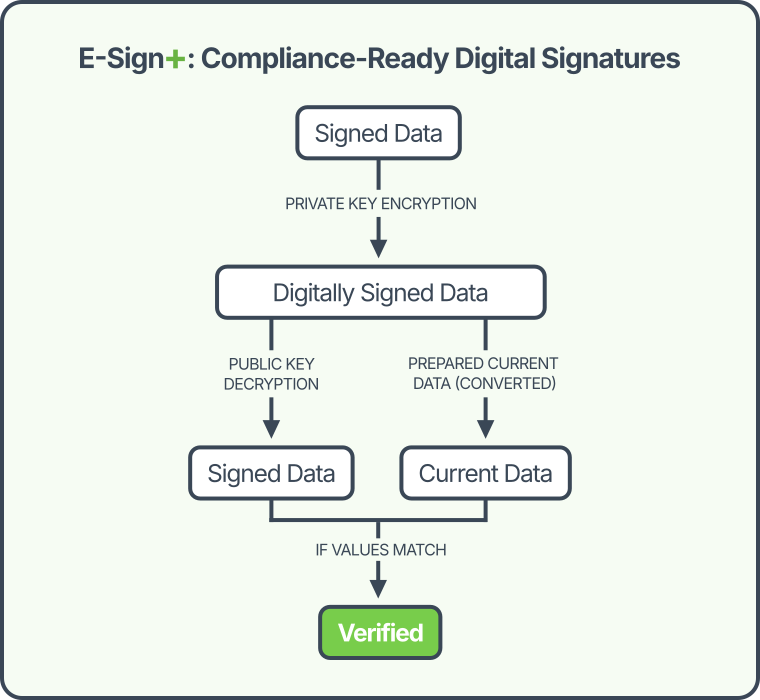
E-Sign+ creates a cryptographic signature for the selected submission data, form context, and configured submission properties. If the protected values change later, the signature no longer validates.
That distinction matters. In regulated workflows, the question is not only, “Was there a signature?” The harder question is, “Can we prove this is still the same data that was signed?”
Form.io answers that question at the data layer, where the submission already lives.

The signature process runs inside your application environment, so sensitive submission data and signature evidence do not need to move to an external provider.

Signed data remains accessible through the native Form.io submission ID and APIs, keeping signatures connected to the application workflow.

Create immutable data snapshots inside your application without requiring a PDF-first process, while still exporting to PDF when the workflow requires it.

Use your own private keys, store them outside the deployment when needed, or integrate cryptographic operations through AWS KMS.

Capture consent against the exact patient data, disclosures, and form context inside the healthcare workflow your application already manages.

Protect approvals, loan terms, underwriting decisions, disclosures, and internal sign-offs with tamper-evident validation.

Keep applications, attestations, approvals, and regulated submissions inside the environment where governance and auditability are already enforced.
That requires cryptographic signing, revision-aware submission handling, invalidation behavior, API access, key management, signature metadata, and a user-facing stamp that makes validity understandable.
E-Sign+ gives self-hosted Form.io customers a governed digital signature module without forcing the organization into disconnected document infrastructure.
Select the component that acts as the signature and choose whether it protects specific fields, all form data, or selected submission properties.
Use a compatible field type, including text fields, checkboxes, dates, email fields, or a traditional signature component, to capture the signing action.
Display a configurable signature stamp and validate whether the signed values, form revision, and selected context remain unchanged.




